
Integrating Gravity Forms with Grand View API
This guide outlines how to integrate a Gravity Form on your WordPress site with the Grand View API using the Gravity Forms Webhooks Add-On. It walks through creating the form, configuring the webhook settings, and mapping form fields to the required API keys to enable seamless data submission.
Prerequisites
To complete this integration, ensure the following plugins are installed on your WordPress site:
-
Note: Other form builders that support webhooks may be compatible. However, Grand View does not provide support for configuring these integrations.
Create a New Form
In the WordPress dashboard, go to Forms > New Form.
Create your form with the necessary fields (e.g., name, email, phone, address, etc.).
Configure the Webhook
Navigate to Forms > select your form > Settings > Webhooks.
Click Add New to begin setting up the webhook.
Configure the webhook settings as follows:
- Request URL: Use the POST URL provided by Grand View.
- Request Method:
POST - Request Format:
JSON - Request Headers: Leave this section blank.
- Request Body: Select Select Fields.
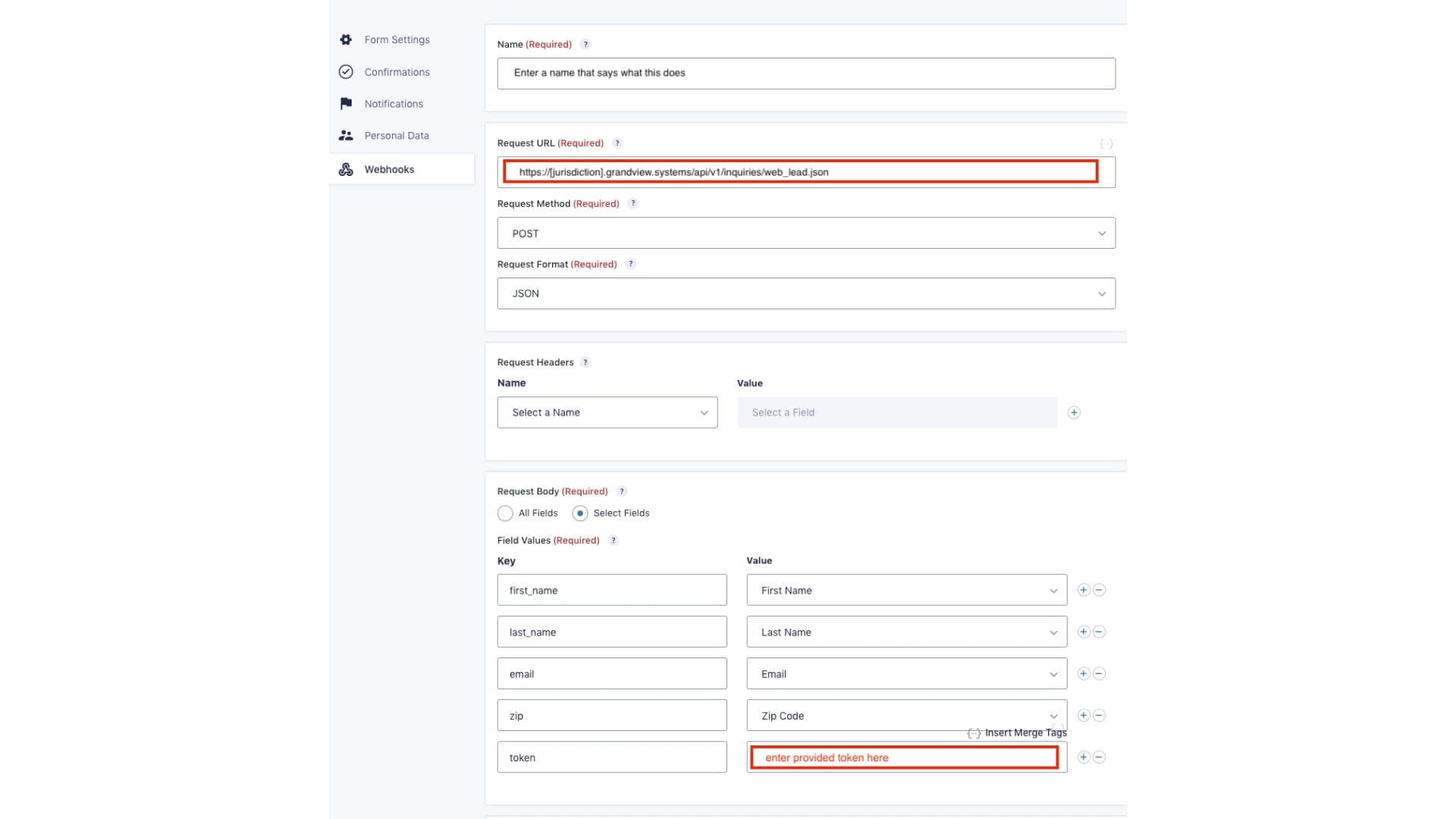
For Leads: Request URL will be your jurisdictions Grand View URL with /api/v1/inquiries/web_lead.json added to the end.
For Inquiries: Request URL will be your jurisdictions Grand View URL with /api/v1/inquiries/web_inquiry.json added to the end.
Field Values
Match each form field to the corresponding API key expected by Grand View. See examples below:
](https://assets.guidejar.com/uploads/TrYocX4qduCLHklQaePb/dGZn7Kn7f6fWFF47F0R9TgKiBVy2/41fb2f8d-dd8f-410b-b07a-e412e4ec6358/1744382189637.jpeg)
Click Update Settings to save the webhook.